Unity User Community
The Unity facilitation team maintains a vibrant Unity User Community on Slack. To join, read the community guidelines below and then follow the sign-up links at the bottom of the page. By signing up, you agree to adhere to the community guidelines.
Unity User Community Guidelines
The Unity User Community is intended to be an inclusive online space to get help with research computing, collaborate with other users in your domain, and to interact with the Unity facilitation team. To maintain safety and inclusion for everyone in our diverse community, we require adhering to the following rules:
- Be kind and respectful: the name Unity extends to our user community. We’re all united to create a positive, welcoming community where everyone feels safe to ask questions, share ideas and thoughts, and give kind suggestions and feedback. Please treat your fellow users and the Unity team members with kindness and respect.
- Focus on research computing: the goal of this community is to provide a space to discuss and get help with research computing. You’re welcome to post questions that aren’t specifically Unity cluster related. However, posts that are not relevant to research computing will be deleted.
- Follow channel organization guidelines: keep channels on topic for their intended purpose as defined below. However, if you’re not sure where to post a question, just make your best judgement for the location and don’t hesitate to post!
- Post publicly first: by posting your questions in
#help-deskrather than direct messaging Unity team members, your questions have the opportunity to help others in the community. In addition, your question is visible to other Unity team members and users, which will expedite a response. If you DM a Unity team member, we may redirect you to post to#help-deskfirst. If your question contains sensitive research information that you are not comfortable sharing publicly, consider submitting a ticket instead. - Be patient: while the Unity team monitors Slack frequently, please allow one business day for a response. Posts after 5 pm Eastern time or on weekends and holidays may not be answered until the next business day.
- No harassment: any inappropriate, discriminatory, rude, or aggressive posts, comments, or DMs to other users or staff members will not be tolerated. The post will be deleted and you may be removed from the community without a warning. If you are subjected to harassment by anyone in the Unity user community, please report it to hpc@umass.edu or a Unity team member.
Channel guidelines
Have an idea for a channel? Contact hpc@umass.edu!
Note: The respective links to each channel may not work unless you click the option to open the link in your browser
- #help-desk: for asking questions about the Unity cluster and research computing. Generally, if you have a question or need help with an error or bug, it should go here.
- #job-extensions: for requesting Unity job extensions. Please avoid posting job extension requests in other channels.
- #announcements: for Unity-related news announcements posted by the Unity team. Please do not post in this channel. Your post will be removed to keep the announcements front and center.
- #events: for research computing events of interest to the community. If you would like to post an event advertisement, please contact hpc@umass.edu for permission prior to posting.
- #general: mostly serves as a landing channel or catch-all channel. Most topics of discussion have a better home elsewhere, but please post here if you have a question or discussion that follows the community guidelines but does not fit better in another channel.
- #job-board: for posting jobs related to research computing or HPC. All community members are welcome to advertise jobs here. However, if the Unity team determines your advertisement is off topic or otherwise violates community guidelines, we reserve the right to remove it.
- #research-computing: for general research computing or HPC related news and discussion.
- #bioinformatics: for discussions around bioinformatics and research computing.
- #gpu-pod: for discussions about using the NVIDIA HGX A100 nodes.
How to join
- Follow this Slack join link, which redirects you to a new page.
- If you are a UMass Amherst user, choose “UMass Amherst SSO.” If you are from any other Unity institution, choose “Unity External User.”
- You will be redirected to either the UMass SSO page, or the Unity SSO page. Log in with your institutional SSO.
- After registering, sign into the community via the Unity User Community Slack link.
For help using Slack, see the Slack tutorials & videos library.
Invite others to the Slack community
Members of the Unity User Community Slack can request to invite people to the workspace.
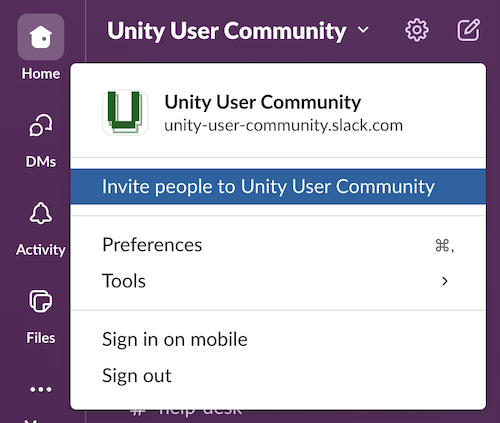
- Click the workspace name, Unity User Community, at the top of the sidebar, which opens a dropdown menu.
- Select Invite people to Unity User Community from the menu.
- Enter the email address of the user(s) you want to invite. Optional: Include a note explaining the reason for requesting the user(s) be invited.
- When finished, click Send Request.
The request is sent to the User Community Slack admins, who will notify you when the request is approved or denied.